Don't know whether this is Devsense related or VS 2022 related. Just for completeness I wanted to let you know.
I've done the following:
- Having latest VS 2022 Preview (3.1) running and a C# solution loaded
- Clicking the "File" > "New" > "Project"
- Selecting "PHP Web Project"
- Clicking "Next" to show the new "Configure your new project" page
- Leaving all defaults, then clicking "Create"
- Having an error message box "OLE_E_PROMPTSAVECANCELLED" shown
- The "Choose the project template" appears on top of the error message box
- Choosing "WordPress"
- Clicking "Finish"
- The WordPress is normally downloaded
- The "Choose project template" dialog is automatically closed
- The error message box too (IIRC)
- The "Configure your new project" wizard was manually closed by clicking the "X"
- The main window is active
After that everything seems to work normally.
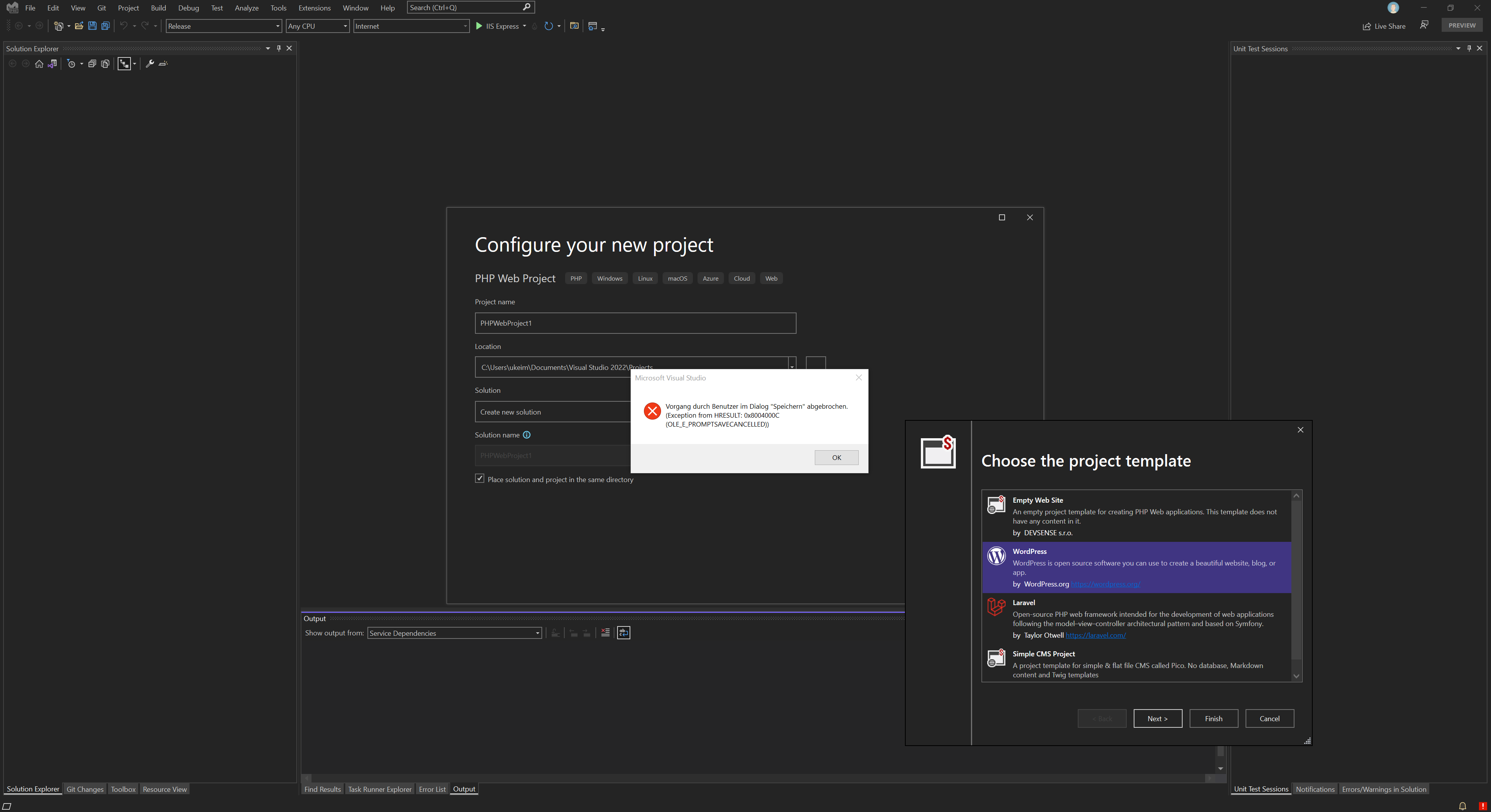
So this is no real error or missing functionality, just some strange behavior. Just letting you know while this all is still in beta/preview so that this maybe helps you guys in polishing your great extension 😀
