Hi, that's a good question and we'll prepare a detailed blog post about it!
You probably want to run laravel's development web server - artisan - which is placed in the root of a common laravel project.
I'm also supposing you have laravel installed and all the composer packages installed properly (https://laravel.com/docs/4.2/quick#installation)
For this setup, first, I would recommend to try that the laravel project runs:
php artisan serve
Then you can stop it, make sure your PHP has a properly configured Xdebug (PHP installed by PHP Tools already has it, otherwise see https://docs.devsense.com/en/vs/debugging/configuring-xdebug for troubleshooting).
In your PHP Project properties, go to Server tab, and select Custom as your Server. Fill in URL (usually artisan runs on localhost:8000).
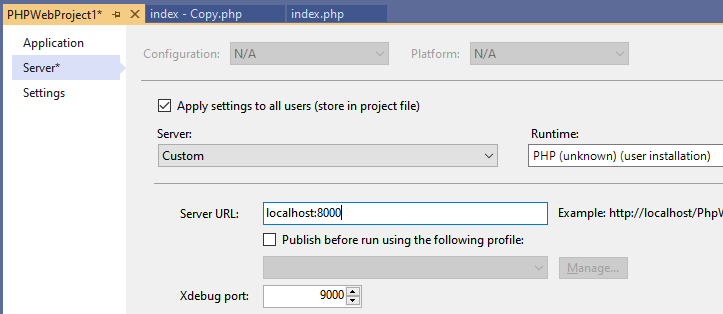
Now run the artisan again:
php artisan serve
and then hit F5 in Visual Studio.
Note you can use any other PHP or web server, just make sure the PHP on that server has enabled Xdebug
